


With the release of iOS 11, Apple developers have destroyed the multi-layered security system that previously existed in the iOS ecosystem. Now absolutely all the security of iOS depends solely on the reliability of the passcode - the device lock password.
It is necessary for an attacker to gain access to the device and learn the passcode (and for many devices of previous generations, this is a matter of technology, not very big money and not too long enumeration), as the owner of the device and account immediately becomes the former. In this article I will tell you how to know the passcode to extract passwords from the iCloud Keychain.
Cloud Bunch of Keys - iCloud Keychain
ICloud Keychain is a cloud service for synchronizing usernames and passwords to websites from the Safari browser, payment card data and Wi-Fi information. The emphasis here is on password synchronization: there is at least one way to set up a cloud keyring in such a way that the passwords themselves, although they will be synchronized via the cloud, will not be stored in iCloud.
Briefly describe the possible scenarios of iCloud keychain operation.
Account without two-factor authentication
If the user turns on the iCloud keychain, but does not set the so-called iCloud security code (this is a separate code that serves to protect the cloud keyring and nothing more), then the passwords to the cloud are not saved; synchronization is carried out exclusively between trusted devices. We are not interested in this scenario.
Account without two-factor authentication
If the user has selected the iCloud security code, then the passwords are already stored in the cloud, but to access them you will need to enter that same security code - under the terms of the task we do not know it. What to do? You can try to activate two-factor authentication in the user account; Knowing the password from Apple ID and changing the trusted phone number will make it very easy. Thus, theoretically, the task is reduced to scenario 3 (there was no possibility to check in practice).
Account with two-factor authentication enabled
Passwords are stored in iCloud, and to access them you will need to enter the password from Apple ID and additionally specify the device lock password - any device (iPhone, iPad, macOS) that is already registered in the cloud keychain, including the iPhone that you have in hands. Problem solved, passwords extracted.
Removing passwords from iCloud Keychain
Consider extracting a cloud keychain in more detail.
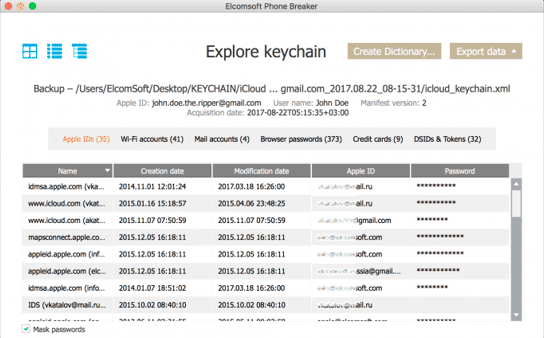

Passwords and authentication tokens from Apple ID are available to you (by the way, here you can also find the user's original password from his Apple ID - for fun, you can put it back), Wi-Fi passwords, mail account passwords, credit cards, as well as all passwords saved in Safari browser.
It is necessary for an attacker to gain access to the device and learn the passcode (and for many devices of previous generations, this is a matter of technology, not very big money and not too long enumeration), as the owner of the device and account immediately becomes the former. In this article I will tell you how to know the passcode to extract passwords from the iCloud Keychain.
Cloud Bunch of Keys - iCloud Keychain
ICloud Keychain is a cloud service for synchronizing usernames and passwords to websites from the Safari browser, payment card data and Wi-Fi information. The emphasis here is on password synchronization: there is at least one way to set up a cloud keyring in such a way that the passwords themselves, although they will be synchronized via the cloud, will not be stored in iCloud.
Briefly describe the possible scenarios of iCloud keychain operation.
Account without two-factor authentication
If the user turns on the iCloud keychain, but does not set the so-called iCloud security code (this is a separate code that serves to protect the cloud keyring and nothing more), then the passwords to the cloud are not saved; synchronization is carried out exclusively between trusted devices. We are not interested in this scenario.
Account without two-factor authentication
If the user has selected the iCloud security code, then the passwords are already stored in the cloud, but to access them you will need to enter that same security code - under the terms of the task we do not know it. What to do? You can try to activate two-factor authentication in the user account; Knowing the password from Apple ID and changing the trusted phone number will make it very easy. Thus, theoretically, the task is reduced to scenario 3 (there was no possibility to check in practice).
Account with two-factor authentication enabled
Passwords are stored in iCloud, and to access them you will need to enter the password from Apple ID and additionally specify the device lock password - any device (iPhone, iPad, macOS) that is already registered in the cloud keychain, including the iPhone that you have in hands. Problem solved, passwords extracted.
Removing passwords from iCloud Keychain
Consider extracting a cloud keychain in more detail.
- In Elcomsoft Phone Breaker choose Tools - Apple - Download from iCloud - Keychain.
- Log in to iCloud (login, password, one-time code 2FA).
- From the list, select the Trusted device (the same iPhone that you have in your hands) and enter the password from it in the Device passcode field.
- Go back to the main screen and open the Keychain Explorer.
Passwords and authentication tokens from Apple ID are available to you (by the way, here you can also find the user's original password from his Apple ID - for fun, you can put it back), Wi-Fi passwords, mail account passwords, credit cards, as well as all passwords saved in Safari browser.